Showing posts with label SQL Server. Show all posts

Friday, November 02, 2012

SQL Server: INSERT INTO ... SELECT vs SELECT ... INTO

In a forum discussion ( in Chinese), a general comment implies that 'SELECT ... INTO' is faster than 'INSERT INTO ..SELECT' to load data to a table because of the minimal logging. However, I checked BOL document and found that we can also achieve minimal logging with 'INSERT INTO ... SELECT' construct given the requirements met as described below:

Using INSERT INTO .. SELECT to Bulk Load Data with Minimal Logging

You can use INSERT INTO SELECT FROM to efficiently transfer a large number of rows from one table, such as a staging table, to another table with minimal logging. Minimal logging can improve the performance of the statement and reduce the possibility of the operation filling the available transaction log space during the transaction . Minimal logging for this statement has the following requirements:

- The recovery model of the database is set to simple or bulk-logged.
- The target table is an empty or nonempty heap.
- The target table is not used in replication.
- The TABLOCK hint is specified for the target table.


BOL also describes the logging behaviour of SELECT ... INTO clause:

The amount of logging for SELECT...INTO depends on the recovery model in effect for the database. Under the simple recovery model or bulk-logged recovery model, bulk operations are minimally logged. With minimal logging, using the SELECT... INTO statement can be more efficient than creating a table and then populating the table with an INSERT statement.

Seeing is believing. So I planed several test cases in my SQL Express 2012 instance. In these test cases, I used different methods to populate 1M rows from an existing table called big_table to a new table called my_table.

Test case 1 using "SELECT ... INTO"
use dbadmin
go

drop table my_table;
go
  
DBCC SHRINKFILE (N'DBAdmin_log' , 0, TRUNCATEONLY)
go

declare @size_s  float 
declare @size_e  float

SELECT  @size_s = cntr_value
FROM sys.dm_os_performance_counters 
WHERE counter_name = 'Log File(s) Used Size (KB)'
AND instance_name = 'DBAdmin'

print 'start : ' + str(@size_s)

select  b.scattered_data, b.vc_small, b.id  into my_table
from big_table b 
 
SELECT  @size_e = cntr_value
FROM sys.dm_os_performance_counters 
WHERE counter_name = 'Log File(s) Used Size (KB)'
AND instance_name = 'DBAdmin'

print 'end  : ' +  str(@size_e)

PRINT 'size used (KB) =' + convert(varchar(30), @size_e - @size_s) 


I configured the database DBADMIN to different recovery mode and run the above code, here are the output

/*  test run 1 - simple 

(1 row(s) affected)
DBCC execution completed. If DBCC printed error messages, contact your system administrator.
start :        428

(1000000 row(s) affected)
end  :        996
size used (KB) =568
*/

/* test run 2 - bulk-logged 
(1 row(s) affected)
DBCC execution completed. If DBCC printed error messages, contact your system administrator.
start :        450

(1000000 row(s) affected)
end  :       1078
size used (KB) =628

*/

/* test run 3  - full 

(1 row(s) affected)
DBCC execution completed. If DBCC printed error messages, contact your system administrator.
start :        432

(1000000 row(s) affected)
end  :      33276
size used (KB) =32844

*/

It can be seen that with Simple or Bulk-logged mode, the transaction log used only 500-600 KB, while with Full recovery mode it is about 32 MB. After that, I have tested "INSERT INTO ... SELECT" with different recovery mode and also check the effect of 'TABLOCK' hint

Test case 2 using "INSERT INTO ... SELECT"
use dbadmin
go

drop table my_table;
go

create table my_table(
  A  int,
  B  varchar(10),
  C  int
  );

  
DBCC SHRINKFILE (N'DBAdmin_log' , 0, TRUNCATEONLY)
go

declare @size_s  float 
declare @size_e  float

SELECT  @size_s = cntr_value
FROM sys.dm_os_performance_counters 
WHERE counter_name = 'Log File(s) Used Size (KB)'
AND instance_name = 'DBAdmin'

print 'start : ' + str(@size_s)

-- insert into my_table (A,B,C)
insert into my_table with (TABLOCK) (A,B,C) 
select  b.scattered_data, b.vc_small, b.id 
from big_table b 
 
SELECT  @size_e = cntr_value
FROM sys.dm_os_performance_counters 
WHERE counter_name = 'Log File(s) Used Size (KB)'
AND instance_name = 'DBAdmin'

print 'end  : ' +  str(@size_e)

PRINT 'size used (KB) =' + convert(varchar(30), @size_e - @size_s)

Test results:
/* test run 1 - Simple
(1 row(s) affected)
DBCC execution completed. If DBCC printed error messages, contact your system administrator.
start :        450

(1000000 row(s) affected)
end  :       1009
size used (KB) =559

*/

/* test run 2  - Bulk-logged
(1 row(s) affected)
DBCC execution completed. If DBCC printed error messages, contact your system administrator.
start :        450

(1000000 row(s) affected)
end  :       1017
size used (KB) =567

*/

/*   test run 3 -- Full 
(1 row(s) affected)
DBCC execution completed. If DBCC printed error messages, contact your system administrator.
start :        450

(1000000 row(s) affected)
end  :      33408
size used (KB) =32958

*/

/* test run 4  -- Simple but without TABLOCK hint (Full, Bulk-logged have similar values)

(1 row(s) affected)
DBCC execution completed. If DBCC printed error messages, contact your system administrator.
start :        428

(1000000 row(s) affected)
end  :     125834
size used (KB) =125406
*/

In the first three test run, I used the "TABLOCK" hint. It can be seen that in terms of the amount of transaction log used, using "INSERT INTO ... SELECT" with "TABLOCK" hint is essentially same as using "SELECT ... INTO" regardless of recovery mode. Without the "TABLOCK" hint, regardless of the recovery mode, using "INSERT INTO ... SELECT" will generate same amount of transaction log and 4 times more than that in the case of FULL recovery mode with the hint ( i.e. 125406 KB vs 32958 KB in my test case). People think "INSERT INTO ... SELECT" is slow may be because they don't always remember to add this hint when appropriate.

Friday, October 19, 2012

Install Sample AdventureWorksLT2012 OLTP database on my SQL Server 2012 Express

I downloaded the mdf file from http://msftdbprodsamples.codeplex.com/releases/view/55330 and placed it at C:\mssql_data. The in SSMS window, I issued:
CREATE DATABASE AdventureWorks2012
ON (FILENAME = 'C:\mssql_data\AdventureWorksLT2012_Data.mdf')
FOR ATTACH_REBUILD_LOG ;

The message recieved are as follows:
File activation failure. The physical file name "C:\Program Files\Microsoft SQL Server\MSSQL11.MSSQLSERVER\MSSQL\DATA\AdventureWorksLT2012_log.ldf" may be incorrect.
New log file 'C:\mssql_data\AdventureWorksLT2012_Data_log.ldf' was created.
Converting database 'AdventureWorks2012' from version 705 to the current version 706.
Database 'AdventureWorks2012' running the upgrade step from version 705 to version 706.

It should be noted that I have to change the file permission in order to install it sucessfully. The screen shot for the file permission is shown below:
The "full control" should be selected.

Saturday, October 13, 2012

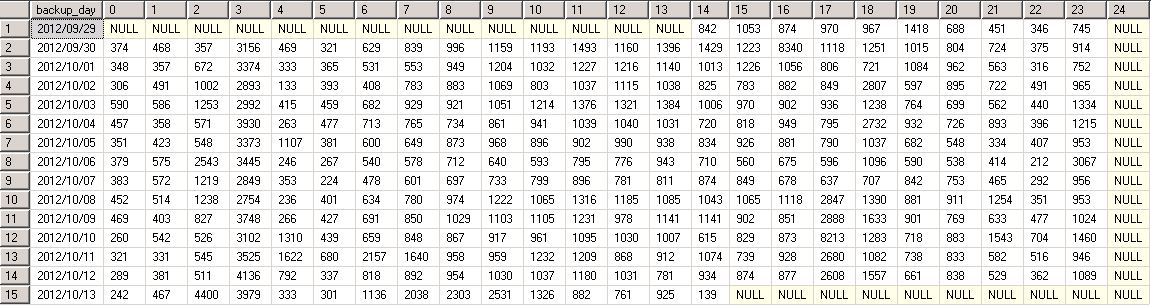
SQL Server - Query shows hourly log backup size of a database in the tabular format

The query uses PIVOT feature:

--- in SQL Server, for databases using FULL recovery model, their transaction logs are backed up
--- quite frequently in a typical env. This query gives hourly log backup size of a database for 
--- each day in the tabular format
with B (backup_day, backup_hour, LogBackupSize_MB)
as
(
 select backup_day, backup_hour, cast(sum(backup_size)/1000000 as int) LogBackupSize_MB
 from 
 (
 select 
        convert(char(23), bs.backup_start_date, 111) as backup_day
      , cast(datepart(hh, bs.backup_start_date) as varchar) backup_hour 
      , bs.backup_size as  backup_size
 from
    msdb.dbo.backupset bs  
 WHERE  (CONVERT(datetime, bs.backup_start_date, 102) >= GETDATE() - 14)  
 and bs.database_name = 'MYDBNAME'
 and bs.type='L' 
 ) A
 group by backup_day, backup_hour
) 
select * from B  -- cols to pivot: backup_day, hour, LogBackupSize_MB
pivot (
   max(LogBackupSize_MB) -- Pivot on this column
   for backup_hour in ([0],[1],[2],[3],[4],[5],[6],[7],[8],[9],[10],[11],[12],
                [13],[14],[15], [16],[17],[18],[19],[20],[21],[22],[23],[24] ))  -- make backup_hour one of this     
   as LogBackupSizeHourly  -- Pivot table alias

In one of our production SQL Server databases, the transaction log backup happens every 15 min. Below is the sample output from the query:

Wednesday, October 10, 2012

SQL Server - Script to show the size of all databases and database files

As a practise to write T-SQL code, comes up with the following script:


-- show size of all databases and database files
-- uncommenet out the following 4 lines if used in  sqlcmd

:setvar sqlcmdheaders            40     -- "page size"
:setvar sqlcmdcolwidth          132     -- line width
:setvar sqlcmdmaxfixedtypewidth  32     -- max column width (fixed length)
:setvar sqlcmdmaxvartypewidth    32     -- max column width (varying length)


IF Object_id(N'tempdb..#tempTbl') IS NOT NULL
DROP TABLE #temptbl


CREATE TABLE #tempTbl
( DBName VARCHAR(50),
  DBFileName VARCHAR(50),
  PhysicalFileName NVARCHAR(260),
  FileSizeMB decimal(18,1)
)


declare @cmd1 varchar(500)
set @cmd1 ='
insert into #tempTbl
SELECT ''?'' as DBName
   ,cast(f.name as varchar(25)) as DBFileName
   ,f.Filename as PhysicalFileName
   ,cast (round((f.size*8)/1024.0,2) as decimal(18,2)) as FileSizeinMB
FROM ?..SYSFILES f
'
exec sp_MSforeachdb @command1=@cmd1


select *
from #tempTbl
order by DBName

select case when (GROUPING(DBName)=1) then '*** Total size ***'
       else isnull(DBname, 'UNKNOWN')
       end AS DBName
      ,SUM(FileSizeMB) As FileSizeMBSum
from #tempTbl
group by DBName with ROLLUP
order by FileSizeMBSum


Sample output when used in sqlcmd:

$ sqlcmd -i dbfile_size.sql
DBName                           DBFileName                       PhysicalFileName                 FileSizeMB
-------------------------------- -------------------------------- -------------------------------- --------------------
DBAdmin                          DBAdmin                          c:\Program Files\Microsoft SQL S                  4.0
DBAdmin                          DBAdmin_log                      c:\Program Files\Microsoft SQL S                  1.0
DBAdmin                          DBAdmin_P01                      c:\Program Files\Microsoft SQL S                  4.0
master                           master                           c:\Program Files\Microsoft SQL S                  4.0
master                           mastlog                          c:\Program Files\Microsoft SQL S                   .8
model                            modeldev                         c:\Program Files\Microsoft SQL S                  3.1
model                            modellog                         c:\Program Files\Microsoft SQL S                   .8
msdb                             MSDBData                         c:\Program Files\Microsoft SQL S                 13.8
msdb                             MSDBLog                          c:\Program Files\Microsoft SQL S                   .8
ReportServer$SQLEXPRESS          ReportServer$SQLEXPRESS          c:\Program Files\Microsoft SQL S                  5.1
ReportServer$SQLEXPRESS          ReportServer$SQLEXPRESS_l        c:\Program Files\Microsoft SQL S                  4.2
ReportServer$SQLEXPRESSTempDB    ReportServer$SQLEXPRESSTe        c:\Program Files\Microsoft SQL S                  4.1
ReportServer$SQLEXPRESSTempDB    ReportServer$SQLEXPRESSTe        c:\Program Files\Microsoft SQL S                  1.1
tempdb                           tempdev                          c:\Program Files\Microsoft SQL S                  3.1
tempdb                           templog                          c:\Program Files\Microsoft SQL S                   .8

(15 rows affected)
DBName                           FileSizeMBSum
-------------------------------- ----------------------------------------
model                                                                 3.9
tempdb                                                                3.9
master                                                                4.8
ReportServer$SQLEXPRESSTempDB                                         5.2
DBAdmin                                                               9.0
ReportServer$SQLEXPRESS                                               9.3
msdb                                                                 14.6
*** Total size ***                                                   50.7

(8 rows affected)

Wednesday, October 12, 2011

SQL Server - Find out Transactions per second etc from DM_OS_PERFORMANCE_COUNTERS

In a whitepaper named "Diagnosing and Resolving Latch Contention on SQL Server",  a script is provided to snap DM_OS_WAITE_STATS view to calculate wait over a period of time. In this post, based on the same idea,  I developed a script to snap the DM_OS_PERFORMANCE_COUNTERS view in order to find out transactions/sec for each database. It is also easy to be modified to get other performance counters.


-- script: snap_perf_conuter.sql

/* Snapshot the performance counters (such as transaction/sec) on sys.dm_os_performance_counters
   and store in a table so that they can be used to compute a per second value.
      This script is only applicable to Cntr_Type = 272696576. Different Cntr_type is explained
      in this blog:
        http://rtpsqlguy.wordpress.com/2009/08/11/sys-dm_os_performance_counters-explained/
** Data is maintained in tempdb so the connection must persist between each execution** 
**alternatively this could be modified to use a persisted table in tempdb. if that is changed code should be included to clean up the table at some point.**
 */


use tempdb
go
declare @current_snap_time datetime
declare @previous_snap_time datetime
-- declare @l_counter_name  nchar(128)
declare @sqlcmd nvarchar(4000)
declare @l_counter_name  nvarchar(2000)

-- modify the counter_name as needed, some examples provided 
set @l_counter_name  = '''transactions/sec'''
-- set @l_counter_name = '''Batch Requests/sec'''                                                                                                              
-- set @l_counter_name= '''Page Splits/sec'',''Page lookups/sec'''
-- set @l_counter_name = '''transactions/sec'',''Batch Requests/sec'''                                                                                                              
-- set @l_counter_name='''Page compression attempts/sec'',''Page Deallocations/sec'',''Page lookups/sec'',''Page reads/sec'',''Page Splits/sec'',''Page writes/sec'',''Pages Allocated/sec'',''Pages compressed/sec'''
-- set @l_counter_name = '''Logins/sec'',''Logouts/sec'''                                                                                              


if not exists(select name from tempdb.sys.sysobjects where name like '#_perf_counter%') 
create table #_perf_counter ( "object_name" nchar(128) ,counter_name nchar(128) ,instance_name nchar(128) ,cntr_value bigint ,cntr_type int ,snap_time datetime
)

set @sqlcmd ='
insert into #_perf_counter (
object_name
,counter_name
,instance_name
,cntr_value
,cntr_type
,snap_time
)
select
OBJECT_NAME
,counter_name
,instance_name
,cntr_value
,cntr_type
,getdate()
from sys.dm_os_performance_counters
where counter_name in (' +  @l_counter_name +  ')'

exec sp_executesql @sqlcmd

--get the previous and current collection point
select top 1 @previous_snap_time = snap_time from #_perf_counter where snap_time < (select max(snap_time) from #_perf_counter) order by snap_time desc

select @current_snap_time = max(snap_time) from #_perf_counter

-- debug
select @current_snap_time end_time, @previous_snap_time start_time

set @sqlcmd='
select
e.object_name
,e.counter_name
,e.instance_name
,(e.cntr_value -s.cntr_value) / DATEDIFF(ss, s.snap_time, e.snap_time)  Per_Sec_Value 
--, s.snap_time as [start_time] 
--, e.snap_time as [end_time] , DATEDIFF(ss, s.snap_time, e.snap_time) as [seconds_in_sample] from #_perf_counter e inner join  
( select * from #_perf_counter   
where snap_time ='''+ convert(varchar(100), @previous_snap_time, 21) + ''' ) s on ( e.instance_name=s.instance_name and e.object_name = s.object_name and e.instance_name=s.instance_name 
   and e.counter_name=s.counter_name)
where e.snap_time= '''+  convert(varchar(100), @current_snap_time, 21) + ''' and e.counter_name in (' +  @l_counter_name + ')order by Per_Sec_value desc'


exec sp_executesql @sqlcmd

--clean up table
 delete from #_perf_counter
 where snap_time = @previous_snap_time

-----------------  end of script  ----

Sample output (edited) :
end_time                start_time
----------------------- -----------------------
2011-10-12 18:47:25.173 2011-10-12 18:46:23.190

(1 row(s) affected)

object_name                         counter_name     instance_name               Per_Sec_Value        seconds_in_sample
----------------------------------- ---------------- --------------------------- -------------------- -----------------
MSSQL$FPSEFSDB_OP2:Databases        Transactions     _Total                      296                  62
MSSQL$FPSEFSDB_OP2:Databases        Transactions     tempdb                      126                  62
MSSQL$FPSEFSDB_OP2:Databases        Transactions     Orderplacement              100                  62
MSSQL$FPSEFSDB_OP2:Databases        Transactions     master                      60                   62
MSSQL$FPSEFSDB_OP2:Databases        Transactions     Distributor                 2                    62
MSSQL$FPSEFSDB_OP2:Databases        Transactions     NOCVDB                      1                    62
MSSQL$FPSEFSDB_OP2:Databases        Transactions     DBADB                       1                    62
MSSQL$FPSEFSDB_OP2:Databases        Transactions     msdb                        1                    62
MSSQL$FPSEFSDB_OP2:Databases        Transactions     tempdbx                     0                    62
MSSQL$FPSEFSDB_OP2:Databases        Transactions     spot_admin                  0                    62
MSSQL$FPSEFSDB_OP2:Databases        Transactions     ASPState                    0                    62
MSSQL$FPSEFSDB_OP2:Databases        Transactions     APPCACHELOG                 0                    62
MSSQL$FPSEFSDB_OP2:Databases        Transactions     VGISessions                 0                    62
MSSQL$FPSEFSDB_OP2:Databases        Transactions     SSNSDB                      0                    62
MSSQL$FPSEFSDB_OP2:Databases        Transactions     SSNS4DB                     0                    62
MSSQL$FPSEFSDB_OP2:Databases        Transactions     copper                      0                    62
MSSQL$FPSEFSDB_OP2:Databases        Transactions     VZWPCAT                     0                    62
MSSQL$FPSEFSDB_OP2:Databases        Transactions     model                       0                    62
MSSQL$FPSEFSDB_OP2:Databases        Transactions     mssqlsystemresource         0                    62

Saturday, October 08, 2011

SQL Server - Troubleshooting Deadlock

There is a thread  in the SQLTeam forum that describes a deadlock scenario:
The application inserts a row into a status table. A trigger on the table fires so that when the status id inserted is a certain value it will call a stored procedure, which inserts a row into an accounting table. This whole thing is wrapped in a transaction so it should all be getting rolled back when there are errors. On occasion two threads of the application insert into the status table at nearly the same millisecond, and when both end up calling the stored procedure to insert into the accounting table a deadlock occurs and one is killed.

Two important details were unveiled during the discussion:
(1) the whole transaction took place with isolation level set to be serializable
(2) in the stored procedure, there is an existence check query doing full table scan  on the status table before inserting the row into it.

I try to simulate the deadlock situation for my own better understanding, especially this is the first time I know how to use DBCC trace to troubleshooting deadlock. It is a good practise.

First of all, I created the following test table:


-- create a test table

USE testdata
go

IF OBJECT_ID ( 'mytable', 'U' ) IS NOT NULL
DROP TABLE mytable;
GO


CREATE TABLE mytable
 (
  id  INT,
  val INT,
  padding VARCHAR(4000),
  );

create unique clustered index index01
on mytable(id);

INSERT INTO mytable
SELECT 1, 1, REPLICATE('a', 4000);

INSERT INTO mytable
SELECT 2, 2, REPLICATE('a', 4000);

INSERT INTO mytable
SELECT 3, 3, REPLICATE('a', 4000);

INSERT INTO mytable
SELECT 4, 4, REPLICATE('a', 4000);

go

delete from mytable where id in (2,4);

-- show the location of rows
select
       a.%%physloc%%                          AS Address,
       sys.fn_PhysLocFormatter(a.%%physloc%%) AS AddressText,
       a.id
FROM   mytable a
ORDER BY 2;
go


The remaining two rows in the mytable are located in different page as shown below:

Address    AddressText            id
---------- ---------------------- -----------
0x99000000 (1:153:0)                        1
0xFF420000 (1:17151:0)                      3

Secondly I turn on the deadlock trace:

1> DBCC traceon(1222, -1)
2> go
DBCC execution completed. If DBCC printed error messages, contact your system administrator.


Then I run the following two scripts in two different SSMS windows:


-- script: ins_1.sql 
use testdata
go

set transaction isolation level serializable
begin tran
go
if not exists (select id from mytable where val = 2)
begin
  waitfor delay '00:01:00'
  insert into mytable values (2,2, replicate('a','4000'))
end
go
commit tran
go

-- script: ins_2.sql
use testdata
go

set transaction isolation level serializable
begin tran
go
if not exists (select id from mytable where val = 4)
begin
  waitfor delay '00:01:00'
  insert into mytable values (4,4, replicate('a','4000'))
end
go
commit tran
go


Withing the 1 min delay, run sp_lock procedure, I can see the key-range locks are requested by the two sessions:

spid   dbid   ObjId       IndId  Type Resource                         Mode     Status
------ ------ ----------- ------ ---- -------------------------------- -------- ------
53     8      0           0      DB                                    S        GRANT
52     8      0           0      DB                                    S        GRANT
52     8      0           0      MD   49(90c8bd04:fb81833:777569)      Sch-S    GRANT
53     8      0           0      MD   49(ead7fb30:916efee:7da7e5)      Sch-S    GRANT
53     8      66099276    1      PAG  1:153                            IS       GRANT
52     8      66099276    1      PAG  1:153                            IS       GRANT
53     8      66099276    1      PAG  1:17151                          IS       GRANT
52     8      66099276    1      PAG  1:17151                          IS       GRANT
53     8      66099276    0      TAB                                   IS       GRANT
52     8      66099276    0      TAB                                   IS       GRANT
53     8      66099276    1      KEY  (ffffffffffff)                   RangeS-S GRANT
52     8      66099276    1      KEY  (ffffffffffff)                   RangeS-S GRANT
53     8      66099276    1      KEY  (03000d8f0ecc)                   RangeS-S GRANT
52     8      66099276    1      KEY  (03000d8f0ecc)                   RangeS-S GRANT
53     8      66099276    1      KEY  (010086470766)                   RangeS-S GRANT
52     8      66099276    1      KEY  (010086470766)                   RangeS-S GRANT


Key-range locks protect a range of rows implicitly included in a record set being read by a Transact-SQL statement while using the serializable transaction isolation level. The serializable isolation level requires that any query executed during a transaction must obtain the same set of rows every time it is executed during the transaction. A key range lock protects this requirement by preventing other transactions from inserting new rows whose keys would fall in the range of keys read by the serializable transaction.


After about 1 min, one of the sessions received the following message:

Msg 1205, Level 13, State 48, Line 4
Transaction (Process ID 52) was deadlocked on lock resources with another process and has been chosen as the deadlock victim. Rerun the transaction.
Msg 3902, Level 16, State 1, Line 1
The COMMIT TRANSACTION request has no corresponding BEGIN TRANSACTION.


In the error log, I can find the following:
--------------------- start of error log  ------------------

2011-10-08 11:01:06.38 spid55      DBCC TRACEON 1222, server process ID (SPID) 55. This is an informational message only; no user action is required.
2011-10-08 11:14:42.43 spid16s     deadlock-list
2011-10-08 11:14:42.43 spid16s      deadlock victim=process3313558
2011-10-08 11:14:42.43 spid16s       process-list
2011-10-08 11:14:42.43 spid16s        process id=process3313558 taskpriority=0 logused=132 waitresource=KEY: 8:72057594047889408 (03000d8f0ecc) waittime=3935 ownerId=623111 transactionname=user_transaction lasttranstarted=2011-10-08T11:13:38.497 XDES=0x574bb30 lockMode=RangeI-N schedulerid=4 kpid=8728 status=suspended spid=52 sbid=0 ecid=0 priority=0 trancount=2 lastbatchstarted=2011-10-08T11:13:38.497 lastbatchcompleted=2011-10-08T11:13:38.497 clientapp=Microsoft SQL Server Management Studio - Query hostname=TUSNC012LKVT006 hostpid=4412 loginname=US1\v983294 isolationlevel=serializable (4) xactid=623111 currentdb=8 lockTimeout=4294967295 clientoption1=671090784 clientoption2=390200
2011-10-08 11:14:42.43 spid16s         executionStack
2011-10-08 11:14:42.43 spid16s          frame procname=adhoc line=4 stmtstart=182 stmtend=296 sqlhandle=0x02000000d2ef471c04bdc8903318b80f6975779f09b41ba8
2011-10-08 11:14:42.43 spid16s     insert into mytable values (2,2, replicate('a','4000'))     
2011-10-08 11:14:42.43 spid16s         inputbuf
2011-10-08 11:14:42.43 spid16s     if not exists (select id from mytable where val = 2)
2011-10-08 11:14:42.43 spid16s     begin
2011-10-08 11:14:42.43 spid16s       waitfor delay '00:01:00'
2011-10-08 11:14:42.43 spid16s       insert into mytable values (2,2, replicate('a','4000')) 
2011-10-08 11:14:42.43 spid16s     end
2011-10-08 11:14:42.43 spid16s        process id=process69eaa8 taskpriority=0 logused=132 waitresource=KEY: 8:72057594047889408 (ffffffffffff) waittime=9293 ownerId=623056 transactionname=user_transaction lasttranstarted=2011-10-08T11:13:32.760 XDES=0xff48c10 lockMode=RangeI-N schedulerid=2 kpid=11340 status=suspended spid=53 sbid=0 ecid=0 priority=0 trancount=2 lastbatchstarted=2011-10-08T11:13:32.760 lastbatchcompleted=2011-10-08T11:13:32.760 clientapp=Microsoft SQL Server Management Studio - Query hostname=TUSNC012LKVT006 hostpid=4412 loginname=US1\v983294 isolationlevel=serializable (4) xactid=623056 currentdb=8 lockTimeout=4294967295 clientoption1=671090784 clientoption2=390200
2011-10-08 11:14:42.43 spid16s         executionStack
2011-10-08 11:14:42.43 spid16s          frame procname=adhoc line=4 stmtstart=182 stmtend=296 sqlhandle=0x02000000eec4b91030fbd7eaeeef1609e5a77d124395f09a
2011-10-08 11:14:42.43 spid16s     insert into mytable values (4,4, replicate('a','4000'))     
2011-10-08 11:14:42.43 spid16s         inputbuf
2011-10-08 11:14:42.43 spid16s     if not exists (select id from mytable where val = 4)
2011-10-08 11:14:42.43 spid16s     begin
2011-10-08 11:14:42.43 spid16s       waitfor delay '00:01:00'
2011-10-08 11:14:42.43 spid16s       insert into mytable values (4,4, replicate('a','4000')) 
2011-10-08 11:14:42.43 spid16s     end
2011-10-08 11:14:42.43 spid16s       resource-list
2011-10-08 11:14:42.43 spid16s        keylock hobtid=72057594047889408 dbid=8 objectname=testdata.dbo.mytable indexname=index01 id=lock55da680 mode=RangeS-S associatedObjectId=72057594047889408
2011-10-08 11:14:42.43 spid16s         owner-list
2011-10-08 11:14:42.43 spid16s          owner id=process69eaa8 mode=RangeS-S
2011-10-08 11:14:42.43 spid16s         waiter-list
2011-10-08 11:14:42.43 spid16s          waiter id=process3313558 mode=RangeI-N requestType=convert
2011-10-08 11:14:42.43 spid16s        keylock hobtid=72057594047889408 dbid=8 objectname=testdata.dbo.mytable indexname=index01 id=lock627aa80 mode=RangeS-S associatedObjectId=72057594047889408
2011-10-08 11:14:42.43 spid16s         owner-list
2011-10-08 11:14:42.43 spid16s          owner id=process3313558 mode=RangeS-S
2011-10-08 11:14:42.43 spid16s         waiter-list
2011-10-08 11:14:42.43 spid16s          waiter id=process69eaa8 mode=RangeI-N requestType=convert


--------------------- end of error log  ------------------

The solution to this deadlock situation could be (1) using repeated read isolation level  and/or (2) create an index on the 'val' column. Bottom line, we have to fully understand the requirement to code properly: why we need to insert into a table then using trigger to insert into another table? But this is out of my reach.  Here I am just satisfied with being familiar with SQL Server lock types and DBCC trace command a little bit.

The deadlock shown in this test case belong to a type of deadlock named conversion deadlock. Looking closely at the "resource-list" section of the error log. We can see that both sessions hold the same resource in shared mode (RangeS-S) at the begining. This is no problem. But both sessions then request to convert the lock type to RangeI-N, this reqires the other session give up the RangeS-S lock first. Thus a deadlock happens.

Wednesday, October 05, 2011

SQL Server - Are there any queries using any Plan Guides now?

Plan Guide in SQL Server is equivalent to SQL Profile in Oracle functionally. In Oracle, v$sqlarea has a column called SQL_PROFILE, based on which  I can query this view to check if any queries are using any SQL Profiles. Here is the an example:

select sql_profile, max(sql_text) sample_sql_text, sum(executions) total_executions, 
sum(buffer_gets)/ sum(executions)   gets_per_execs 
from v$sqlarea where sql_profile is not null group by sql_profile;


SQL_PROFILE                      SAMPLE_SQL_TEXT                     TOTAL_EXECUTIONS GETS_PER_EXECS
-------------------------------- ----------------------------------- ---------------- --------------
profile_sfh_user_1               SELECT U.SFH_USER_ID,B.SFH_BTN_ID,U             2254     10.3189885
                                 B.PMT_INDICATOR,U.EMAIL FROM SFH_US
                                 ER U,SFH_BTN B,SFH_USER_BTN UB WHER
                                 E U.SFH_USER_ID = UB.SFH_USER_ID AN
                                 D UB.SFH_BTN_ID = B.SFH_BTN_ID AND
                                 B.CUST_BTN = :B2 AND U.USER_ID = :B
                                 1 AND U.USER_STATUS_CD = 'A' AND UB
                                 .SVC_STATUS ='A' AND B.BTN_STATUS_C
                                 D = 'A'
 
COE_gg3zpxx6j5c8c_4057913317      SELECT COUNT(SESSION_KEY) FROM SFH           638642     7.52062032
                                 _MYACC_SUMMARY WHERE cust_btn=:cust
                                 _btn AND SESSION_KEY like :session_
                                 key_value AND LAST_ACCESS_DATE >= S
                                 YSDATE-1
 
profile_sfh_summary_1            SELECT * FROM SFH_SUMMARY_JOBS WHER             6088     3.84395532
                                 E TTQ_ACCOUNT_ID='999802381'AND CR_
                                 DATE > TRUNC(SYSDATE)
 
COE_1x13vygbj9k9t_142312094      DELETE FROM SFH_MYACC_SUMMARY WHERE             5047     11.3929067
                                  CUST_BTN = :CUST_BTN AND  SESSION_
                                 KEY LIKE :SESSION_KEY

It can been seen that  there are four SQL Profiles being used in this Oracle database (This is one of our production databases. I modified some table names to protect the innocent).


How can I obtain the same information in SQL Server regarding the usage of Plan Guide ? This is what I try to find out in the past few days. Below is what I got so far.


First of all, the output of the following query shows there are three Plan Guids in my AdventureWorks sample database

--  Show Plan Guides I created in AdventureWorks sample database

use AdventureWorks
go
-- usp_p is my own print-rows-as-column procedure
exec usp_p'   
select name,create_date,query_text,scope_type_desc from sys.plan_guides
'
go


OUTPUT ROWS AS COLUMN    
    
----------------------------------------------
name                          : Guide1
create_date                   : Oct  4 2011  4:19PM
query_text                    : SELECT * FROM Sales.SalesOrderHeader AS h,
        Sales.Customer AS c, Sales.SalesTerritory AS t
        WHERE h.CustomerID = c.CustomerID AND c.TerritoryID = t.TerritoryID
            AND t.CountryRegionCode = @Country_region
scope_type_desc               : OBJECT
----------------------------------------------
name                          : MyPlan_Guide_1
create_date                   : Oct  4 2011  6:41PM
query_text                    : SELECT COUNT(*) FROM [HumanResources].[Employee] e INNER JOIN [Person].[Contact] c ON c.[ContactID] = e.[ContactID]
scope_type_desc               : SQL
----------------------------------------------
name                          : Template_Plan_1
create_date                   : Oct  5 2011 11:05AM
query_text                    : select SUM ( LineTotal ) as LineTotal from Sales . SalesOrderHeader H join Sales . SalesOrderDetail D on D . SalesOrderID = H . SalesOrderID where H . SalesOrderID = @0
scope_type_desc               : TEMPLATE
----------------------------------------------


As shown above in the "scope_type_desc" column, in SQL Server, there are three types of Plan Guide: Object, SQL and Template. In summary,
  • An OBJECT plan guide matches queries that execute in the context of Transact-SQL stored procedures, user-defined scalar functions, multi-statement user-defined table-valued functions, and DML triggers.
  • An SQL plan guide matches queries that execute in the context of stand-alone Transact-SQL statements and batches that are not part of a database object. SQL-based plan guides can also be used to match queries that parameterize to a specified form.
  • A TEMPLATE plan guide matches stand-alone queries that parameterize to a specified form. These plan guides are used to override the current PARAMETERIZATION database SET option of a database for a class of queries.


Now, I use the following query in SSMS to check whether any Plan Guides are being used

-- Show if any plan guides are in use now:

SELECT 
   SUBSTRING(st.TEXT, (qs.statement_start_offset/2)+1 , ((CASE qs.statement_end_offset WHEN -1 THEN datalength(st.TEXT) 
   ELSE qs.statement_end_offset END - qs.statement_start_offset)/2) + 1) AS sql_txt 
, qp.query_plan.value('declare default element namespace "http://schemas.microsoft.com/sqlserver/2004/07/showplan"; 
 (/ShowPlanXML/BatchSequence/Batch/Statements/StmtSimple/@PlanGuideDB)[1]' , 'varchar(100)')  AS [PlanGuideDB]
, qp.query_plan.value('declare default element namespace "http://schemas.microsoft.com/sqlserver/2004/07/showplan"; 
 (/ShowPlanXML/BatchSequence/Batch/Statements/StmtSimple/@PlanGuideName)[1]' , 'varchar(100)')  AS [PlanGuideName]
 ,qp.query_plan
, total_worker_time/execution_count AS AvgCPU 
, total_elapsed_time/execution_count AS AvgDuration 
, (total_logical_reads+total_physical_reads)/execution_count AS AvgReads 
, execution_count 
FROM sys.dm_exec_query_stats qs
cross apply sys.dm_exec_sql_text(sql_handle) st
cross apply sys.dm_exec_query_plan(plan_handle) qp
WHERE qp.query_plan.exist('declare default element namespace "http://schemas.microsoft.com/sqlserver/2004/07/showplan";
 /ShowPlanXML/BatchSequence/Batch/Statements/StmtSimple[(@PlanGuideName)]') = 1
ORDER BY [PlanGuideDB], [PlanGuideName] DESC


The idea of this query is from this post: http://www.scarydba.com/2009/02/12/missing-index-information-and-query-stats/ ,  which tries to associate missing index info with the query causing it. Basically I used xquery exist funtion to search if there is a keyword 'PlanGuideName' in the XML text.


Here is the sample output screenshot.


As shown in the screenshot,  the query works for the Object and SQL type Plan Guide. When comes to the template Plan Guide, I encountered difficulties.

The template Plan Guide was created by the following script, which is used to force replacing literals with parameters for a specific type query. By default, database PARAMEDTERIZATION is set to Simple, which will not be applicable to this type of query that has a two-table join.

USE AdventureWorks;
DECLARE @stmt nvarchar(max);
DECLARE @params nvarchar(max);
EXEC sp_get_query_template
    N' SELECT  SUM(LineTotal) AS LineTotal
       FROM    Sales.SalesOrderHeader H
       JOIN    Sales.SalesOrderDetail D ON D.SalesOrderID = H.SalesOrderID
      WHERE   H.SalesOrderID = 56000',
    @stmt OUTPUT,
    @params OUTPUT

EXEC sp_create_plan_guide
    N'Template_Plan_1',
    @stmt,
    N'TEMPLATE',
    NULL,
    @params,
    N'OPTION(PARAMETERIZATION FORCED)';
GO


Then I run the following test to see if the template Plan Guide works:


use AdventureWorks
go

SELECT  SUM(LineTotal) AS LineTotal
FROM    Sales.SalesOrderHeader H
JOIN    Sales.SalesOrderDetail D ON D.SalesOrderID = H.SalesOrderID
WHERE   H.SalesOrderID = 56001
GO


When checking the estimated plan, in the Show Plan XML window, I can find the following text for the "StmtSimple" node:

StmtSimple StatementCompId="1" StatementEstRows="1" StatementId="1" StatementOptmLevel="FULL" StatementOptmEarlyAbortReason="GoodEnoughPlanFound" StatementSubTreeCost="0.00658091"
StatementText="SELECT SUM(LineTotal) AS LineTotal FROM Sales.SalesOrderHeader H
JOIN Sales.SalesOrderDetail D ON D.SalesOrderID = H.SalesOrderID
WHERE H.SalesOrderID = 56001" StatementType="SELECT"
TemplatePlanGuideDB="AdventureWorks" TemplatePlanGuideName="Template_Plan_1" ParameterizedText="(@0 int)
select SUM ( LineTotal ) as LineTotal from Sales . SalesOrderHeader H join Sales . SalesOrderDetail D on D . SalesOrderID = H . SalesOrderID
where H . SalesOrderID = @0"
QueryHash="0x1170510D7B65D486" QueryPlanHash="0x1B1C9CA6A989FB7C"


It can be noticed that there are "TemplatePlanGuideDB" and "TemplatePlanGuideName" attributes presented, which indicates the template Plan Guide will be used. When checking the acutual plan, in the Show Plan XML window, I see different text than above:

StmtSimple StatementCompId="1" StatementEstRows="1" StatementId="1" StatementOptmLevel="FULL"

StatementOptmEarlyAbortReason="GoodEnoughPlanFound" StatementSubTreeCost="0.00658091"
StatementText="select SUM ( LineTotal ) as LineTotal from Sales . SalesOrderHeader H
join Sales . SalesOrderDetail D on D . SalesOrderID = H . SalesOrderID
where H . SalesOrderID = @0" StatementType="SELECT"
QueryHash="0x1170510D7B65D486" QueryPlanHash="0x1B1C9CA6A989FB7C"


Basically in the actual execution plan XML text, there is no such keywords as 'PlanGuideDBName' or 'TemplatePlanGuideDBName'. Due to the lacking of such marks,  the query described previously cannot
be used to answer such a question " Are there any queries using any template Plan Guides now?"

Friday, September 23, 2011

SQL Server - A Procedure to Display Columns as Rows

updated: Oct 12, 2012

As an Oracle DBA, I am used to using command line interface (CLI) for my many DBA tasks. When some long rows are output from a query, it is often very unconvenient to view in CLI windows due to text wrapping at certain lengh. Tom Kyte has developed a procedure in Oracle to display columns as rows. Here I try to accomolish the same thing in SQL Server.

My procedure is called usp_p, the source code can be downloaded here.

Below is an example of using this procedure.

First of all, here is the script (top10_ela.sql ) that displays top 10 sqls ordered by average execution time:

declare @sqltext varchar(4000)

set @sqltext = '
SELECT   top 10
sql_handle
, (SELECT TOP 1 SUBSTRING(s2.text,statement_start_offset / 2+1 ,
     ( (CASE WHEN statement_end_offset = -1
            THEN (LEN(CONVERT(nvarchar(max),s2.text)) * 2)
      ELSE statement_end_offset END)  - statement_start_offset) / 2+1))  AS sql_statement
 , (total_elapsed_time/execution_count)/1000 AS [Avg Exec Time in ms]
 , max_elapsed_time/1000 AS [MaxExecTime in ms]
 , min_elapsed_time/1000 AS [MinExecTime in ms]
 , (total_worker_time/execution_count)/1000 AS [Avg CPU Time in ms]
, qs.execution_count AS NumberOfExecs
, (total_logical_writes+total_logical_Reads)/execution_count AS [Avg Logical IOs]
, max_logical_reads AS MaxLogicalReads
, min_logical_reads AS MinLogicalReads
, max_logical_writes AS MaxLogicalWrites
, min_logical_writes AS MinLogicalWrites
, creation_time
, last_execution_time
FROM sys.dm_exec_query_stats qs
CROSS APPLY sys.dm_exec_sql_text(sql_handle)  s2
WHERE s2.objectid is null
ORDER BY [Avg Exec Time in ms] DESC
';


exec dbadmin.dbo.usp_p @sqltext

go


Below is a sample output from my test sql server instance:

$ sqlcmd -i  top10_ela.sql


OUTPUT COLUMNS AS ROWS - MISSING COLUMN NAME MEANS NULL VALUE

----------------------------------------------
sql_handle                    : 0x0200000027337b02ca2b54f71198517d10d457c2e93900b900000000000000000000000000000000
sql_statement                 : declare StmtCur cursor for
SELECT   top 10
sql_handle
, (SELECT TOP 1 SUBSTRING(s2.text,statement_start_offset / 2+1 ,
     ( (CASE WHEN statement_end_offset = -1
            THEN (LEN(CONVERT(nvarchar(max),s2.text)) * 2)
      ELSE statement_end_offset END)  - statement_start_offset) / 2+1))  AS sql_statement
 , (total_elapsed_time/execution_count)/1000 AS [Avg Exec Time in ms]
 , max_elapsed_time/1000 AS [MaxExecTime in ms]
 , min_elapsed_time/1000 AS [MinExecTime in ms]
 , (total_worker_time/execution_count)/1000 AS [Avg CPU Time in ms]
, qs.execution_count AS NumberOfExecs
, (total_logical_writes+total_logical_Reads)/execution_count AS [Avg Logical IOs]
, max_logical_reads AS MaxLogicalReads
, min_logical_reads AS MinLogicalReads
, max_logical_writes AS MaxLogicalWrites
, min_logical_writes AS MinLogicalWrites
, creation_time
, last_execution_time
FROM sys.dm_exec_query_stats qs
CROSS APPLY sys.dm_exec_sql_text(sql_handle)  s2
WHERE s2.objectid is null
ORDER BY [Avg Exec Time in ms] DESC

Avg Exec Time in ms           :        307
MaxExecTime in ms             :        307
MinExecTime in ms             :        307
Avg CPU Time in ms            :        307
NumberOfExecs                 :          1
Avg Logical IOs               :          0
MaxLogicalReads               :          0
MinLogicalReads               :          0
MaxLogicalWrites              :          0
MinLogicalWrites              :          0
creation_time                 : Oct 12 2012  8:46PM
last_execution_time           : Oct 12 2012  8:46PM
----------------------------------------------
sql_handle                    : 0x02000000cff2b929b1aebd642c8187892cf718f0921cf8bb00000000000000000000000000000000
sql_statement                 : select * from sys.dm_exec_query_stats;

Avg Exec Time in ms           :          0
MaxExecTime in ms             :          0
MinExecTime in ms             :          0
Avg CPU Time in ms            :          0
NumberOfExecs                 :          1
Avg Logical IOs               :          0
MaxLogicalReads               :          0
MinLogicalReads               :          0
MaxLogicalWrites              :          0
MinLogicalWrites              :          0
creation_time                 : Oct 12 2012  8:45PM
last_execution_time           : Oct 12 2012  8:45PM
----------------------------------------------
sql_handle                    : 0x020000004bee4622a78521352165a8a19fc021a4e00df3c900000000000000000000000000000000
sql_statement                 : select table_id, item_guid, oplsn_fseqno, oplsn_bOffset, oplsn_slotid
 from [DBAdmin].[sys].[filetable_updates_2105058535] with (readpast) order by table_id
Avg Exec Time in ms           :          0
MaxExecTime in ms             :          0
MinExecTime in ms             :          0
Avg CPU Time in ms            :          0
NumberOfExecs                 :          2
Avg Logical IOs               :          0
MaxLogicalReads               :          0
MinLogicalReads               :          0
MaxLogicalWrites              :          0
MinLogicalWrites              :          0
creation_time                 : Oct 12 2012  8:46PM
last_execution_time           : Oct 12 2012  8:46PM
----------------------------------------------


Note: I did not verify that every data type can be shown properly as of now, I will probably have to modify the code as time goes.


Update: Oct 19,2012

Learned that SQL Server has a very simple way to turn the query output to XML format by appending "for xml path" at the end.  This has similar effect as output "columns as rows". For example, run: select top 2 * from sys.objects for xml path , it will generate the following XML format:

Wednesday, September 21, 2011

SQL Server - Create a Policy to Enfore Naming Convention on Stored Procedure

In SQL Server 2008, assuming we need to enforce a naming standard on stored procedures:
All stored procedures in the database (TestData) must start with "usp_" - ("usp" stands for user stored procedure).

Step 1 Create the Condition
  1.  In Object Explorer, expand Management, expand Policy Management, expand Conditions, right-click the Conditions node and then click New Condition.
  2.  On the Create New Condition, General page, in the Name box, type the name of the new condition: SP Naming
  3. Select the Multipart Name facet in the Facet box.
  4. In the Expression area, construct the condition expressions : @Name like 'usp_%'.
  5. On the Description page, type a description and then click OK.


Step 2 Create the Policy
  1. In Object Explorer, expand Management, expand Policy Management, right-click Policies, and then click New Policy.
  2. On the Create New Policy, General page, in the Name box, type the name of the new policy: SP Naming Policy.
  3. If you want the policy to be enabled as soon as it is created, select the Enabled check box.
  4. If the evaluation mode is On demand, the Enabled check box is not available.
  5. In the Check condition box, select the existing condition: SP Naming. To edit the condition, select the condition and then click the build (...) button.
  6.  In the Against targets box, select the Every StoredProcedure target. Create a new condition TestData DB Only in the Database Node (Facet: Database, Condition: @Name='testdata').
  7. In the Evaluation Mode box, select how this policy will behave: On Change: Prevent. Different conditions can have different valid evaluation modes.
  8. To limit the policy to subset of the target types, in the Server restriction box, select from limiting conditions or create a new condition.
  9. On the Description page, in the Category box, select an optional policy category or create a new one.
  10. Type n optional description of the policy.
  11.  Click OK.


When the policy is enabled, trying to create a procedure that violates the policy, the following message is received:

Changed database context to 'testdata'.
Policy 'SP Naming Policy' has been violated by 'SQLSERVER:\SQL\TUSNC012LKVT006\DEFAULT\Databases\testdata\StoredProcedures\dbo.HelloWorld3_proc'.
This transaction will be rolled back.
Policy condition: '@Name LIKE 'usp_%''
Policy description: ''
Additional help: '' : ''
Statement: '
create procedure HelloWorld3_proc
as
select 'HelloWorld'
'.
Msg 3609, Level 16, State 1, Server TUSNC012LKVT006, Procedure sp_syspolicy_dispatch_event, Line 65
The transaction ended in the trigger. The batch has been aborted.

Thursday, September 08, 2011

SQL Server - test case showing rows moved when creating a clustered index

Recently I have determined to study SQL Server. Of course, this is not the first time I attempt to do so. Just this time I decided not to spend time on Oracle voluntarily and to concentrate on SQL server instead. 

I have noticed that in SQL Server it is highly recommended that every table should have a clustered index. A table with a clustered index (CI) conceptually corresponds to the Index Organized Table (IOT) in Oracle. Basically, the leaf node of the index contains the data block (called B+ tree index). I also found a blog post that attempted to explain why SQL Server needs to use CI to achieve performance while IOT is not used in Oracle as widely as the CI in SQL Sever. But I am still not very clear about the reasons after reading the post.

If a table does not have a CI and we want to create  CI on it, the existing rows should be reorganized to occupy the pages in the sorted key order. This is what I try to confirm with the following test case.

Test case:
-- script: rowmove.sql
-- purpose: demonstrate table rows moved when creating clustered index
-- env    : SQL Server 2008
--

:setvar sqlcmdheaders            40     -- "page size"
:setvar sqlcmdcolwidth          132     -- line width
:setvar sqlcmdmaxfixedtypewidth  32     -- max column width (fixed length)
:setvar sqlcmdmaxvartypewidth    32     -- max column width (varying length)

USE testdata
go

IF OBJECT_ID ( 'mytable', 'U' ) IS NOT NULL 
DROP TABLE mytable;
GO


CREATE TABLE mytable
 (
  id  INT,
  col1 VARCHAR(2000),
  col2 VARCHAR(2000));

INSERT INTO mytable
SELECT 1, REPLICATE('a', 2000), REPLICATE('b', 2000);

INSERT INTO mytable
SELECT 4, REPLICATE('a', 2000), REPLICATE('b', 2000);


INSERT INTO mytable
SELECT 2, REPLICATE('a', 2000), REPLICATE('b', 2000);

INSERT INTO mytable
SELECT 3, REPLICATE('a', 2000), REPLICATE('b', 2000);


go

select 
       a.%%physloc%%                          AS Address,
       sys.fn_PhysLocFormatter(a.%%physloc%%) AS AddressText,
       a.id
FROM   mytable a
ORDER BY 2;
go

print " "
print "  ----  After created clustered index on ID ----"
print " "

go

create unique clustered index index01 
on mytable(id);
go

select 
       a.%%physloc%%                          AS Address,
       sys.fn_PhysLocFormatter(a.%%physloc%%) AS AddressText,
       a.id
FROM   mytable a
ORDER BY 2;
go


Test output:

Changed database context to 'testdata'.

(1 rows affected)
Address    AddressText                      id         
---------- -------------------------------- -----------
0xFA420000 (1:17146:0)                                1
0xFA420000 (1:17146:1)                                4
0xFD420000 (1:17149:0)                                2
0xFD420000 (1:17149:1)                                3

(4 rows affected)
 
  ----  After created clustered index on ID ----
 
Address    AddressText                      id         
---------- -------------------------------- -----------
0x99000000 (1:153:0)                                  3
0x99000000 (1:153:1)                                  4
0xFE420000 (1:17150:0)                                1
0xFE420000 (1:17150:1)                                2

(4 rows affected)


It can be seen that in this test case one page can hold maximum 2 table rows. At the begining, table rows with id=1 and 4 reside on page 17146, and with id=2,3 resides on page 17149. This is understandable as we inserted the rows in the order of 1,4,2,3. After create a CI on ID column, the rows with id=1,2 moved to page 153 and rows with id=3,4 moved to page 17150. So the rows occupies the pages in the sorted order of ID. It should be noted that the pages that belong to the table do not need to physically on the disk files closely to each other.