Wednesday, October 31, 2012
Drop indexes that have never been used
Here is the plan:
1. Identify the indexes that are not appeared in the execution plan
create table index_drop_candidates
as
select owner, index_name
from dba_indexes
where owner='INDEXOWNER'
minus
(
select object_owner, object_name
from v$sql_plan
where object_type ='INDEX'
and object_owner='INDEXOWNER'
union
select object_owner, object_name
from dba_hist_sql_plan
where object_type ='INDEX'
and object_owner='INDEXOWNER'
);
2. Exclude those indexes used for constraints
delete from index_drop_candidates
where index_name in
(
select constraint_name from dba_constraints where owner='INDEXOWNER' and constraint_type in ('P', 'U', 'R') ) ;
3. Run the following delete statement manually or put in the cron from time to time for some time
delete from index_drop_candidates
where index_name in
(
select object_name
from v$sql_plan
where object_type ='INDEX'
and object_owner='INDEXOWNER'
union
select object_name
from dba_hist_sql_plan
where object_type ='INDEX'
and object_owner='INDEXOWNER'
);
4. After some time, change those indexes still in the index_drop_candidates table to be invisible to observe any performance impact and decide if drop them accordingly
Note: There are cases that indexes have never been used in the execution plan, but they are needed to help CBO to choose a better plan. If such indexes are dropped, performance could be negatively impacted.


Friday, October 19, 2012
Install Sample AdventureWorksLT2012 OLTP database on my SQL Server 2012 Express
I downloaded the mdf file from http://msftdbprodsamples.codeplex.com/releases/view/55330 and placed it at C:\mssql_data. The in SSMS window, I issued:
 The "full control" should be selected.
CREATE DATABASE AdventureWorks2012
ON (FILENAME = 'C:\mssql_data\AdventureWorksLT2012_Data.mdf')
FOR ATTACH_REBUILD_LOG ;
The message recieved are as follows:
File activation failure. The physical file name "C:\Program Files\Microsoft SQL Server\MSSQL11.MSSQLSERVER\MSSQL\DATA\AdventureWorksLT2012_log.ldf" may be incorrect.
New log file 'C:\mssql_data\AdventureWorksLT2012_Data_log.ldf' was created.
Converting database 'AdventureWorks2012' from version 705 to the current version 706.
Database 'AdventureWorks2012' running the upgrade step from version 705 to version 706.
It should be noted that I have to change the file permission in order to install it sucessfully. The screen shot for the file permission is shown below:

Saturday, October 13, 2012
SQL Server - Query shows hourly log backup size of a database in the tabular format
The query uses PIVOT feature:
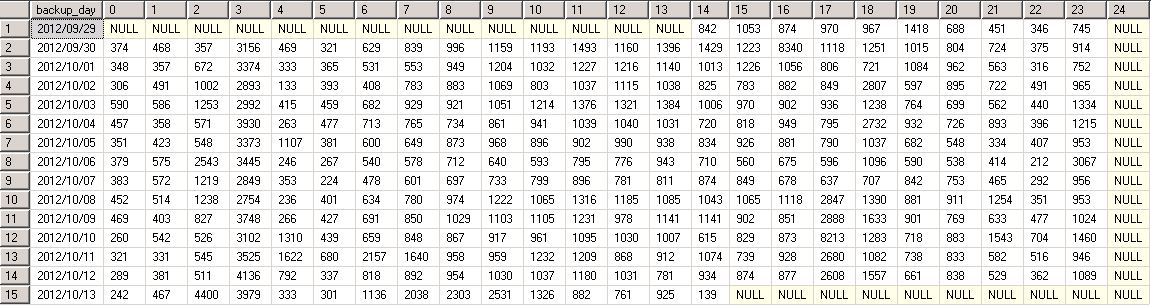
In one of our production SQL Server databases, the transaction log backup happens every 15 min. Below is the sample output from the query:
--- in SQL Server, for databases using FULL recovery model, their transaction logs are backed up
--- quite frequently in a typical env. This query gives hourly log backup size of a database for
--- each day in the tabular format
with B (backup_day, backup_hour, LogBackupSize_MB)
as
(
 select backup_day, backup_hour, cast(sum(backup_size)/1000000 as int) LogBackupSize_MB
 from
 (
 select
        convert(char(23), bs.backup_start_date, 111) as backup_day
      , cast(datepart(hh, bs.backup_start_date) as varchar) backup_hour
      , bs.backup_size as  backup_size
 from
    msdb.dbo.backupset bs
 WHERE  (CONVERT(datetime, bs.backup_start_date, 102) >= GETDATE() - 14)
 and bs.database_name = 'MYDBNAME'
 and bs.type='L'
 ) A
 group by backup_day, backup_hour
)
select * from B  -- cols to pivot: backup_day, hour, LogBackupSize_MB
pivot (
   max(LogBackupSize_MB) -- Pivot on this column
   for backup_hour in ([0],[1],[2],[3],[4],[5],[6],[7],[8],[9],[10],[11],[12],
                [13],[14],[15], [16],[17],[18],[19],[20],[21],[22],[23],[24] ))  -- make backup_hour one of this
   as LogBackupSizeHourly  -- Pivot table alias
In one of our production SQL Server databases, the transaction log backup happens every 15 min. Below is the sample output from the query:
Wednesday, October 10, 2012
SQL Server - Script to show the size of all databases and database files
As a practise to write T-SQL code, comes up with the following script:
-- show size of all databases and database files
-- uncommenet out the following 4 lines if used in  sqlcmd

:setvar sqlcmdheaders            40     -- "page size"
:setvar sqlcmdcolwidth          132     -- line width
:setvar sqlcmdmaxfixedtypewidth  32     -- max column width (fixed length)
:setvar sqlcmdmaxvartypewidth    32     -- max column width (varying length)


IF Object_id(N'tempdb..#tempTbl') IS NOT NULL
DROP TABLE #temptbl


CREATE TABLE #tempTbl
( DBName VARCHAR(50),
  DBFileName VARCHAR(50),
  PhysicalFileName NVARCHAR(260),
  FileSizeMB decimal(18,1)
)


declare @cmd1 varchar(500)
set @cmd1 ='
insert into #tempTbl
SELECT ''?'' as DBName
   ,cast(f.name as varchar(25)) as DBFileName
   ,f.Filename as PhysicalFileName
   ,cast (round((f.size*8)/1024.0,2) as decimal(18,2)) as FileSizeinMB
FROM ?..SYSFILES f
'
exec sp_MSforeachdb @command1=@cmd1


select *
from #tempTbl
order by DBName

select case when (GROUPING(DBName)=1) then '*** Total size ***'
       else isnull(DBname, 'UNKNOWN')
       end AS DBName
      ,SUM(FileSizeMB) As FileSizeMBSum
from #tempTbl
group by DBName with ROLLUP
order by FileSizeMBSum
Sample output when used in sqlcmd:
$ sqlcmd -i dbfile_size.sql
DBName                           DBFileName                       PhysicalFileName                 FileSizeMB
-------------------------------- -------------------------------- -------------------------------- --------------------
DBAdmin                          DBAdmin                          c:\Program Files\Microsoft SQL S                  4.0
DBAdmin                          DBAdmin_log                      c:\Program Files\Microsoft SQL S                  1.0
DBAdmin                          DBAdmin_P01                      c:\Program Files\Microsoft SQL S                  4.0
master                           master                           c:\Program Files\Microsoft SQL S                  4.0
master                           mastlog                          c:\Program Files\Microsoft SQL S                   .8
model                            modeldev                         c:\Program Files\Microsoft SQL S                  3.1
model                            modellog                         c:\Program Files\Microsoft SQL S                   .8
msdb                             MSDBData                         c:\Program Files\Microsoft SQL S                 13.8
msdb                             MSDBLog                          c:\Program Files\Microsoft SQL S                   .8
ReportServer$SQLEXPRESS          ReportServer$SQLEXPRESS          c:\Program Files\Microsoft SQL S                  5.1
ReportServer$SQLEXPRESS          ReportServer$SQLEXPRESS_l        c:\Program Files\Microsoft SQL S                  4.2
ReportServer$SQLEXPRESSTempDB    ReportServer$SQLEXPRESSTe        c:\Program Files\Microsoft SQL S                  4.1
ReportServer$SQLEXPRESSTempDB    ReportServer$SQLEXPRESSTe        c:\Program Files\Microsoft SQL S                  1.1
tempdb                           tempdev                          c:\Program Files\Microsoft SQL S                  3.1
tempdb                           templog                          c:\Program Files\Microsoft SQL S                   .8

(15 rows affected)
DBName                           FileSizeMBSum
-------------------------------- ----------------------------------------
model                                                                 3.9
tempdb                                                                3.9
master                                                                4.8
ReportServer$SQLEXPRESSTempDB                                         5.2
DBAdmin                                                               9.0
ReportServer$SQLEXPRESS                                               9.3
msdb                                                                 14.6
*** Total size ***                                                   50.7

(8 rows affected)
Thursday, October 04, 2012
Using SQL Performance Analyzer in the planning of 11g upgrade for a critical database
In my working environment, there is a one-way replication setup from database ttpseprd to ttpsefh. Database ttpseprd has OLTP-type workload and ttpsefh is a reporting database. The two databases have almost same schemas and objects. Some time ago ttpsefh was upgraded from 10g to 11g and now the ttpseprd is planned to be upgraded to 11g soon. So the ttpsefh could be an ideal environment to test if there are any SQLs currentely run in the 10g ttpseprd database would be regressed after upgrade. For that purpose, I have conducted several SQL Peformnace Analyzer (SPA) experiments in a test 11gR2 database environment called dbahrgrd.
From the Grid Control homepage of the dbahrgrd database instance, by clicking the following links: Advisor Central => SQL Performance Analyzer => Guided Workflow, I can see the following five steps regarding how to execute a successful two-trial SPA test:
To complete the step 1, I need a STS obviously. I first created a STS called STS_TTPSEPRD_10G in the ttpseprd database and used OEM Grid Control to load the set from past 7 days of AWR data and from cursors in the shared pool as well. Behind the scene, the code used by OEM looks like:
The STS_TTPSEPRD_4 was created through the following code:
With the STS ready, it is straightforward to create the SPA test task through OEM.
In step 2, I executed the SQLs in the 10g ttpseprd database:
In step 3, I executed the SQLs in the 11g ttpsefh database:
It should be noted that in order to execute step 3 and 4, a database link should be valid from dbahrgrd to ttpsefhd and ttpseprd, respectively. In addition, the connecting user should be granted ADVISOR role and the privillege to execute SYS.DBMS_SQLPA procedure.
In step 4, I did comparsizon based on Buffer Gets:

It can be seen that there are Improvement Impact 21% and Regression Impact -2% in the 11g environment. By click the -2% link, we can check in detail about the regressed SQL. In this case only one SQL found and actually the plan was same essentially. So no real regression at all. I did similar tests on other three categories of SQLs. With these experiments, I am very confident that the upgrade will be successful at least in the area of SQL performance.
From the Grid Control homepage of the dbahrgrd database instance, by clicking the following links: Advisor Central => SQL Performance Analyzer => Guided Workflow, I can see the following five steps regarding how to execute a successful two-trial SPA test:
- Create SQL Performance Analyzer Task based on SQL Tuning Set
- Create SQL Trial in Initial Environment
- Create SQL Trial in Changed Environment
- Compare Step 2 and Step 3
- View Trial Comparison Report
To complete the step 1, I need a STS obviously. I first created a STS called STS_TTPSEPRD_10G in the ttpseprd database and used OEM Grid Control to load the set from past 7 days of AWR data and from cursors in the shared pool as well. Behind the scene, the code used by OEM looks like:
DECLARE
   sqlset_cur dbms_sqltune.sqlset_cursor;
   bf VARCHAR2(80);
BEGIN
   bf := q'#UPPER(PARSING_SCHEMA_NAME) IN ('TTQMIGADMIN', 'TTQ2TACPVIEW', 'TTQ2_TACP') #';
   OPEN sqlset_cur FOR
      SELECT VALUE(P)
         FROM TABLE( dbms_sqltune.select_workload_repository( '57490', '58146', bf, NULL, NULL, NULL, NULL, 1, NULL, NULL)) P;
   dbms_sqltune.load_sqlset( sqlset_name=>'STS_TTPSEPRD_10G'
                           , populate_cursor=>sqlset_cur
                           , load_option => 'MERGE'
                           , update_option => 'ACCUMULATE'
                           , sqlset_owner=>'VUSERID');
END;


DECLARE
   sqlset_cur dbms_sqltune.sqlset_cursor;
   bf VARCHAR2(80);
BEGIN
   bf := q'#UPPER(PARSING_SCHEMA_NAME) IN ('TTQMIGADMIN', 'TTQ2TACPVIEW', 'TTQ2_TACP') #';
   OPEN sqlset_cur FOR
      SELECT VALUE(P) FROM TABLE( dbms_sqltune.select_cursor_cache(bf, NULL, NULL, NULL, NULL, 1, NULL, 'TYPICAL')) P;
   dbms_sqltune.load_sqlset( sqlset_name=>'STS_TTPSEPRD_10G'
                           , populate_cursor=>sqlset_cur
                           , load_option => 'MERGE'
                           , update_option => 'ACCUMULATE'
                           , sqlset_owner=>'VUSERID');
END;
Then following the procedure described in this Oracle document , I've transported STS_TTPSEPRD_10G from ttpseprd to dbahrgrd. There are 25993 SQLs in the set originally. I deleted all SQLs starting with 'insert', 'update' and 'detele' using the following syntax: BEGIN
DBMS_SQLTUNE.DELETE_SQLSET(
sqlset_name => 'STS_TTPSEPRD_10G',
basic_filter => 'UPPER(SQL_TEXT) LIKE ''DELETE%''');
END;
/
After the deletion, the total number of the SQLs in the set come down to 19201. The SQLs in the set can be further categorized based on the number of executions. The following queries showed the number of SQLs in each category based on the executions range I chose. SQL> select count(*) from DBA_SQLSET_STATEMENTS WHERE SQLSET_OWNER ='VUSERID' AND SQLSET_NAME= 'STS_TTPSEPRD_10G' and executions > 200;
COUNT(*)
----------
3210
SQL> select count(*) from DBA_SQLSET_STATEMENTS WHERE SQLSET_OWNER ='VUSERID' AND SQLSET_NAME= 'STS_TTPSEPRD_10G' and executions between 5 and 200;
COUNT(*)
----------
3509
SQL> select count(*) from DBA_SQLSET_STATEMENTS WHERE SQLSET_OWNER ='VUSERID' AND SQLSET_NAME= 'STS_TTPSEPRD_10G' and executions between 2 and 4;
COUNT(*)
----------
8160
SQL> select count(*) from DBA_SQLSET_STATEMENTS WHERE SQLSET_OWNER ='VUSERID' AND SQLSET_NAME= 'STS_TTPSEPRD_10G' and executions=1;
COUNT(*)
----------
4322
It can be seen that there are many SQLs with executions equal one. Most of them was due to SQLs not using bind variables. For each category, I created a corresponding STS and did a SPA test on it. Below I will describe the test on the STS_TTPSEPRD_4 that contains SQLs with executions > 200. The STS_TTPSEPRD_4 was created through the following code:
-- create a new STS from an existing STS
BEGIN
  DBMS_SQLTUNE.CREATE_SQLSET(
    sqlset_name => 'STS_TTPSEPRD_10G_4',
    description  => 'subset of STS_SSODPRD_10G executions > 200');
END;
/

-- select from a sql tuning set and pass cursor to load_sqlset
DECLARE
  cur sys_refcursor;
BEGIN
  OPEN cur FOR
    SELECT VALUE (P)
    FROM table(dbms_sqltune.select_sqlset(
        'STS_TTPSEPRD_10G',
        basic_filter => 'executions > 200'
   )) P;

  -- Process each statement (or pass cursor to load_sqlset)

    DBMS_SQLTUNE.LOAD_SQLSET(
             sqlset_name     => 'STS_TTPSEPRD_10G_4',
             populate_cursor => cur);

  CLOSE cur;
END;
/
With the STS ready, it is straightforward to create the SPA test task through OEM.
In step 2, I executed the SQLs in the 10g ttpseprd database:
begin
  dbms_sqlpa.execute_analysis_task(task_name => 'TTPSEPRD_TASK4'
            , execution_type => 'TEST EXECUTE'
            , execution_name => 'SQL_TRIAL_1349293404432'
            , execution_desc => 'execute in prd'
            , execution_params => dbms_advisor.arglist('LOCAL_TIME_LIMIT', '300', 'TIME_LIMIT', 'UNLIMITED', 'DATABASE_LINK', 'TTPSEPRD.MYCOMPA.COM')
                                  );
end;
In step 3, I executed the SQLs in the 11g ttpsefh database:
begin
  dbms_sqlpa.execute_analysis_task(task_name => 'TTPSEPRD_TASK4'
                                 , execution_type => 'TEST EXECUTE'
                                 , execution_name => 'SQL_TRIAL_1349294911119'
                                 , execution_desc => 'in ttpsefh'
                                 , execution_params => dbms_advisor.arglist('LOCAL_TIME_LIMIT', '300', 'TIME_LIMIT', 'UNLIMITED', 'DATABASE_LINK', 'TTPSEFH.MYCOMPA.COM')
                                  );
end;
It should be noted that in order to execute step 3 and 4, a database link should be valid from dbahrgrd to ttpsefhd and ttpseprd, respectively. In addition, the connecting user should be granted ADVISOR role and the privillege to execute SYS.DBMS_SQLPA procedure.
In step 4, I did comparsizon based on Buffer Gets:
begin
  dbms_sqlpa.execute_analysis_task(task_name => 'TTPSEPRD_TASK4'
                                 , execution_type => 'compare performance'
                                 , execution_name => 'COMPARE_1349297988711'
                                 , execution_params => dbms_advisor.arglist('comparison_metric', 'BUFFER_GETS', 'execution_name1',
                                           'SQL_TRIAL_1349293404432', 'execution_name2', 'SQL_TRIAL_1349294911119', 'TIME_LIMIT', 'UNLIMITED')
                                  );
end;
At last, come to the exciting part - step 5. It took just one click to view the result. The following is a screenshot of the overall report.
It can be seen that there are Improvement Impact 21% and Regression Impact -2% in the 11g environment. By click the -2% link, we can check in detail about the regressed SQL. In this case only one SQL found and actually the plan was same essentially. So no real regression at all. I did similar tests on other three categories of SQLs. With these experiments, I am very confident that the upgrade will be successful at least in the area of SQL performance.
Subscribe to:
Comments (Atom)


